
Install the latest driver for HP Officejet 4500 All-in-One Printer
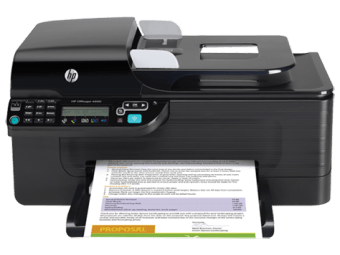
HP Officejet 4500 All-in-One Printer Driver is a free utility application developed by Hewlett-Packard Co. As the name suggests, this is a driver package for HP OfficeJet 4500 All-in-One Printer - G510g. It allows you to download, install and set up the latest and official version of drivers for the aforementioned printer.
Top Recommended Alternative

HP Officejet 4500 All-in-One Printer Driver is available for 32 and 64 bit PCs. Although, before downloading, you first need to identify the operating system of your device. And as of this writing, the driver is only compatible with Windows 7.
A printer driver for Windows 7
The HP Officejet 4500 is an all-in-one full-featured printer. It features a 20-sheet, automatic document feeder for handling big printing jobs and even multi-page documents. Moreover, these printers come with built-in WiFi and a 100-page fax memory. All in all, this printer series can serve all the purposes for your home or office. Although, as with other printers, you need a printer driver to keep up with the latest features.
HP Officejet 4500 All-in-One Printer Driver is a tool that can help you. As mentioned, it lets you download and install the latest version of HP Officejet 4500. It is available for both 32 and 64-bit PC architecture. Although, the driver is only available for Windows 7. If you have an operating system higher than that, you cannot proceed with the download as there is no driver available.
If you have a compatible OS, however, you can install the driver via CD or manually using the Windows inbuilt (Add a Printer) method. You can add a network printer to Windows or a USB-connected printer. Not only that, but you can also set up these printers without installing additional drivers. Note, however, that you can experience driver conflicts on your computer, which can affect the performance of the printer.
Should you download it?
Overall, HP Officejet 4500 All-in-One Printer Driver can help you get the most out of your HP Officejet 4500 All-in-One Printer. The app makes it easy for you to download the latest and original version of the printer and connect it to your computer. However, as the driver is only available for Windows 7, it can be a bummer for those who have a higher iteration of the Windows OS.